Showing posts with label Tool. Show all posts

Saturday, October 19, 2013

Unlock password protected pdf files: pdfunlock.

I have been doing some works with pdf files auto fill with itextsharp. one of the file that client gave me was secure and password protected. When ever I try to open this using Adobe Acrobat Pro. Its shows that it have to be opened by Adobe life cycle designer.

Then I installed Adobe life cycle designer and tried opening it, unfortunately end up getting a password window and couldn’t  proceed.

Then of course googled it and found this awesome web where you can unlock pdf online.

http://www.pdfunlock.com/

Cheers!

Thursday, September 20, 2012

An easy tool to convert vb.net project to c# project in a flash

I would like to share a very interesting and helpful tool that made my life easier and hope in some corner another developer will be beneficial with it.
Recently we had a solution from one of our customer where we had around 50 project mixed and matched with VB.net and c# projects. It was getting hectic for our developers to switch context and syntax.
I finally took liberty to find out an easy way to convert the projects. With little bit of goggling I would this awesome tool that made my developer’s life easy.

VB.Net to C# Converter 3.02

image
It you can choose to select one single file or entire project or even a solutions, isn’t it great. After proceed with the conversion project you would see some warning and and possible conversion error. Those are easily handballed.
It took only 1 hour or so to convert a project with all kind of migration. I removed the old vb.net project and then add back the c# project. fixed the project references. That’s it.

Friday, April 13, 2012

Use Debug Mode's Wink to create simple interactive tutorial or cast.

The primary intention is to create tutorial, if you have ever used Camtasia you can not be satisfied with this small software, but if you think about money you would certainly get convinced about it, because it free!.

And the beauty is you can create interactive tutorial where user will interact with the presentation.

Bellow the official statement is given.

“Wink is a Tutorial and Presentation creation software, primarily aimed at creating tutorials on how to use software (like a tutor for MS-Word/Excel etc). Using Wink you can capture screenshots, add explanations boxes, buttons, titles etc and generate a highly effective tutorial for your users.”

image

Bellow the feature’s are given

  • Freeware: Distributed as freeware for business or personal use. However if you want to redistribute Wink, you need to get permission from the author.
  • Cross-Platform: Available for all flavours of Windows and various versions of Linux (x86 only).
  • Audio: Record voice as you create the tutorial for explaining better.
  • Input formats: Capture screenshots from your PC, or use images in BMP/JPG/PNG/TIFF/GIF formats.
  • Output formats: Macromedia Flash, Standalone EXE, PDF, PostScript, HTML or any of the above image formats. Use Flash/html for the web, EXE for distributing to PC users and PDF for printable manuals.
  • Multilingual support: Works in English, French, German, Italian, Danish, Spanish, Serbian, Japanese, Brazilian Portuguese and Simplified/Traditional Chinese.
  • Smart Capture Tools: Capture screenshots automatically as you use your PC, based on mouse and keyboard input (great time saver and generates professional captures).
  • Performance/Quality: Creates highly compressed Flash presentations (few kbs to few hundreds of kbs, much smaller than competing commercial products) ideal for using on the web.

After install you have simple tutorial which is made with wink and really helpful to get started with the tool.

image

I would use it and suggest everyone to give a try.

Friday, March 2, 2012

JustDecompile, how to get .net decompiled in a flash.

Alright, today we have a new point of focus, the target topic is JustDecompile, it’s a free decompile tool provided by none other then Telerik, thanks to them we have yet another awesome decompile tool in the community, most importantly, its completely free.

Anyone can download it from Telerik site http://www.telerik.com/products/decompiler.aspx. When you download the installer, it only downloads a web installer, kind of web platform installer thing.

image

After download, when you lunch the application, you would be given a choices to install wide range of tools, all that have telerik in there product line. Our focus is only “JustDecompile”. So choosing the right checkbox. You can also try some other productivity tool if you want to give it a try.

image

This is the nagging part, it ask for registration or username and password if you already have one. Since the product is free, it Should be totally free of any kind of registration. Unlike us telerik has different idea about the information collection policy.

image]

After login you the real installation will begin. Its going to download about 25 Megabyte of data. And going to take about a 5 minute or less depending on your internet bandwidth.

image

After installation lunch the application, the User interface is really good. And the tool is super simple. Just open any dll it will be added to the left side tree view, you can then open any class of your choice, one very interesting feature that catch my eye is that you can change the language, i.e. you can choose in which language you want to view the code.

image

This can be a good conversion product also.

Friday, February 24, 2012

ILSpy (free .net decompiler): possible replacement for .net Reflector.

Today I am going to share about and very simple yet helpful tool named ILSpy. It could be a possible replacement for the “.net Reflector” which is now a commercial version by Red Get Software.

ILSpy is a useful and yet not that much feature rich tool, may be because of its early stage, however; the rood map shows that it could turn out to be a handy tool in near future.

Users can download this from the http://wiki.sharpdevelop.net/ilspy.ashx. Did I mention that its open source and absolutely free!

image

Some interesting features are
  • Assembly browsing
  • IL Disassembly
  • Decompilation to C#
    • Supports lambdas and 'yield return'
    • Shows XML documentation
  • Saving of resources
  • Save decompiled assembly as .csproj
  • Search for types/methods/properties (substring)
  • Hyperlink-based type/method/property navigation
  • Base/Derived types navigation
  • Navigation history
  • BAML to XAML decompiler
  • Save Assembly as C# Project
  • Find usage of field/method
  • Extensible via plugins (MEF)
  • Please visit the home site of Ilspy for more information on this tool.

    Until next time, happy coding.

    Friday, February 3, 2012

    Snoop for WPF, a WPF Spy.

    Life would be much easier, if we had a tool like firebug for WPF, where we can see the anatomy of the application which is running. Luckily some of the WPF geeks are not as much lazy as we are and created a awesome tool for us named Snoop for WPF.

    Here is what you can do with it,

    • Can see the visual tree
    • Change property at runtime
    • Visual layers as 3d View.

    image

    Download and experience this tool from http://snoopwpf.codeplex.com/.

    May the force be with you!.

    Thursday, November 17, 2011

    KAXAML, another xaml editor for free!

    As the heading suggests Kaxaml is a open source free xmal editor, it has split xmal and WPF deginer view, but the designer is so far view only all the editing has to be done in the xmal editor part.

    You can download this from http://kaxaml.com/

    image

    It’s a small 1.7 mb package and comes with some handily features, you can create xaml for both wpf and Silverlight in single window side by side, note that there is no project concept only xmal document can be created and saved. However, it has some fair amount of intellisence.

    image

    By the way as no drag and drop feature is still here I would still prefer expression blend over this, and of course visual studio express editions and visual studio professional is far better as far as features are concern.

    But for faster editing we can always use the Snippets tab for faster xmal writing. Lots of snippet is given there to help us do fast editing.

    Never the less it’s a good tool to play with xaml.

    Thursday, November 10, 2011

    Export your illustrator object to XAML,”Making xmal icon is so easy now!”

    Making XAML Icon and objects are not fairly easy!. Just found from the designer of our company that I can create a icon in illustrator and then directly export it to XAML and use it in our project. XAMLExport is a small plugin and worth trying, More over one very interesting thing is that its completely free!.

    Here is where you can download the plugin.

    http://www.mikeswanson.com/xamlexport/

    image

    Download and use it, you would love it. In future I would try to add a small tutorial to explain how we could be benefited from this plugin more, perhaps a guided tutorial to create a simple icon.

    Friday, March 4, 2011

    Mockup builder : Yet another awesome mockup building tool for your software.

    In one of my last post I have discussed about an interesting web based tool to design and manage project the creately project to be precise. In this post I want to share another tool, I really find this tool useful, there is a whole lot of tools and controls set to build any kind of mockup. And I found this a perfect replacement of visio. but I must mention one point here before the continuation of the post, its Free!, its still in beta state though, hope this will be free in the release version also.

    image

    This tool is written entirely in Silverlight, and must say this is an state of art example what Silverlight can do, this project has also has out of browser experience so you can also install this in your local machine for offline browsing. you guys can checkout this tool from http://mockupbuilder.com/.

    image

    Some very interesting feature is that you can create project and design multi-screen mockups. I hope this tool will be free for use as long as it remains.

    Thursday, September 3, 2009

    How to work in really local repository with svn.

    Two things, First “I don’t want to install a source control repository”, second, “I want the source control in my local machine” finally “I want the facility to check in, check out and keep source history”, That’s actually three things, well what come in my mind is the Tortoise SVN facility.

    Create A local repository

    Here is how we can do the local repository, first install TortoiseSVN, its totally free so no need to worry about any licensing issue. After successful installation, select any folder from your file system, and right click on that repository. Now from TortoiseSVN menu select “Create repository here”.

    image

    It is going to take only a second to finish the process, Walla your local repository is created. And you will get a confirmation  like the bello window. After that you can choose to created default folder structure. Next step is to add a solution to this local repo.

    image

    Adding source in source control

    Open your desired solution in your visual studio ide. right click on solution explorer solution file, and select Add solution to Source control. Since I have a VS plugin for svn I will get window like bello screen. It’s recommended that you add a visual studio svn plugin like Visual SVN or Ankh SVN in your development machine.

    image

    Click on to finish the process and you will get log message entry window.

    image

    Type your comment and then click ok, that’s it you have a local repository up and working for you.

    Check in and checkout

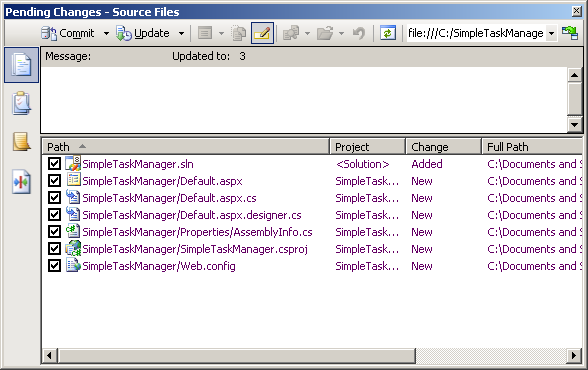
    Bellow I have provided the pending checking window screenshot, after adding the project you might want to add every thing un-committed to the source control.
    image

    History

    Since you have your source control you can now check in and checkout any file, and also keep history and ability to revert the changes if anything goes wrong.

    image

    More over you can track history to find out any changes that is done in the source control.

    image

    Its fun and no worry to loose your code anymore. But I would recommend that you use a svn server, because your machine could crash, but server will have backup facility.

    Until next time, me signing out cya.

    Thursday, August 6, 2009

    AnkhSVN : a free and full integrated SVN tool for VS IDE.

    Subversion integration with VS IDE is one of the necessary things as far as Integrated development is concern. A lot of develop still do folder based file system Update, Merge and Commit while working with code based which has a source control in Subversion.

    Nowadays, since the we all want the luxury of having everything accessible through visual studio ide, why not also svn. There are two important tool that come to my mind right way for svn integration.

    • Visual SVN

    • AnkhSVN

    No doubt that Visual SVN is a wonderful tool that have full integrated feature with visual studio, but main problem with it is that its not free and a commercial tool. If we use express edition of visual studio and want svn integration we might not want to pay for it.

    There AnkhSVN wins, its totally free, for distribution and use. The tool is can be download from http://ankhsvn.open.collab.net/. Ankh SVN is fully integrated and free tool for svn support in visual studio.

    Features are given bellow and taken from the AnkhSVN Site.

    Features

    Pending Changes window

    • One window to handle the normal workflow.
    • Real-time overview of all project changes.
    • Easy access to most Subversion commands.

    Merge Tracking

    • Easy-to-use wizard simplifies merging.
    • Wizard is merge-tracking aware.
    • Intuitive integrated conflict resolution
    • Supports all merge scenarios supported by Subversion 1.5/1.6
    • Works with Subversion 1.5+ servers, and pre-1.5 servers.

    Optimized workflow

    • Don't leave your IDE for most common operations.
    • Immediately view the source control status of all files in your project/solution.
    • View working copy information such as last committed author, last committed date and the repository URL.
    • Import new solutions automatically.
    • Get support for all Subversion transfer protocols.

    Pluggable diff/merge

    • Plug in your diff/merge tool of choice
    • Smart command line templates for the most common merge tools.

    Repository Explorer

    • Easily browse any Subversion repository.
    • View extended information about remote files and directories in the Visual Studio Properties window.

    License

    • AnkhSVN 2.1 is licensed under the open source Apache 2.0 license.

    After installation we can use and when we add the our solution to source control the solution explorer is pretty much looks like the following screen shot.

    image

    Bellow the pending checking window for AnkhSVN is given.

    image

    Hope you will like this tool and use open source solution. Until next time cya.