Thursday, June 21, 2007

Asp.net File Upload Control Using with just one step

In our projects sometimes we need to use the file upload control. Asp.net 2.0 have
a build-in File-upload. In asp.net 1.x web controls didn’t had any builtin file-upload
control. Then we had to use a html input tag with type attribute set to “file” and
to use in server side add runat=”server” attribute.

<input id="myfileuploader" type="file" runat="server"/>

We all know how to work with a file upload control, today we will be discussion
about a new approach of file-upload. file-upload consists of two step . first we
have to select the file and then submit the page with a button or some kind of other
mechanism. To day we will try to minimize one step. If we want to upload the file
with just one step that is selecting the file here is the Technique

A file upload control which is eventually truned into a input html element have
three client side events

    * onBlur      
    * onChange
    * onFocus

we will utilize the onChange event… here is what we will do. frist add a asp.net
2.0 fileupload control in our page. then in pageload event add a attribute in attribute
collection. then write a javascript funtion to submit the form and in code do what
ever we whan….

 
task 1 : add a fileupload control

task 2: add the onchange attribute as FileUpload1.Attributes.Add("onchange", "doSomeStuff()");

task 3: add the javascript to submit the page

<script language="javascript"
type="text/javascript">

function doSomeStuff()
{

         document.forms[0].submit();

}

</script>

Thats it you are good to go.. in page load event check wheither the filename is
empty or not and then do the file upload.

Wednesday, May 2, 2007

Select Items of a html Select

As you all know in asp .net when we define a dropdown list it is converted to a html select.

<asp:DropDownList id="ddlNewsLetter" runat="server"></asp:DropDownList>

Now in html…

Its look like this

<select name="GcbsUC:ddlNewsLetter" id="GcbsUC_ddlNewsLetter">
<option value="1">July 11, 2006</option>
<option value="2">June 14, 2006</option>
<option value="3">May 14, 2006</option>
<option value="4">April 9, 2006</option>
<option value="5">March 16, 2006</option>
<option value="6">February 19, 2006</option>
</select>

In C# code i have populated the dropdown list with a counter and a data…

Well if we what to select a perticular dropdown item from the list… how we do it…

Option

1 . document.getElementById(‘ControlName’).selectedIndex = ‘ourvalue’; [here ourvalue must be an integer and between a range of the options.length.

2. document.getElementById(‘ControlName’).value = “ourknownvalue”;

[here ourknownvalue can be 6 that is <option value="6">February 19, 2006</option>]

3. well can can always loop through the items and do what ever we like with the property

    document.test.test2.options[0].value
    document.test.test2.options[2].text

Here is an example


var ddlNewsLetter = document.getElementById('ddlNewsLetter');
if(ddlNewsLetter!=null)
{
for(var i=0; i < ddlnewsletter.options.length; i++)
{
if(ddlnewsletter.options[i].text == strnewsletterdate)
{
ddlnewsletter.options[i].selected = true;
break;
}
}
}

Wednesday, April 11, 2007

VS 2005 Windows Work Flow ToolBox Section...

Hi Recently i had to work with Windows workflow foundation for some conceptual demo or proof of concept demo. During development time i faced a strange problem. some of the windows workflow tools are not showing in tool box.


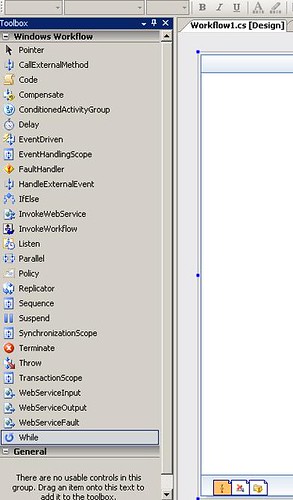
BeforeReset


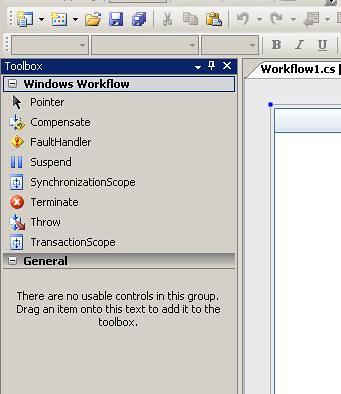
I try to reinstall the workflow extention for Vs2005 but the problem remain. if you see care fully i can not drag and drop a code activity from the tool box. That was a little but disturbing … then i reset the tool box. and every thing got back on line again. i just right click on the tool box a popup menu come up which has a reset menu item.


afterReset...


Some time in some other extention of vs this thing can happen. Dont forget to reset your tool window.

Saturday, March 3, 2007

Install assembly into Global Assembly Cache

Option One

Step One add the sn.exe to External Section of VS2005

1. Click on Menu->Tools->External Tools
2. A window with all external tool listed will popup.. click on add button
3. In title type “String Name tool”
4. In command brows for sn.exe tool [Generally in the bin directory of your sdk folder]
5. Check the use output window and prompt for argument check box…
6. Click on apply to dismiss the widow…

Now you can see that in tools menu you will have a menu item named “Strong Name Tool”. Click on the menu will launch a window asking the argument …. In the argument text box type

–k “c:\\mykeypair.snk”Click on okey to dismiss the window… in output window you will see that successful keypart creation message will be shown…

Your key is reated but not yet associated with any

Adding the key to the project to associate with assembly1. Open your project…
2. Open the property of the project…
3. You will see a tab called signning is bottom of the window… click on the signning button
4. In siginning tab check the sign the assembly check box.
5. In choose a strong name key file … click on brows …. And brows for your mykeypair.snk file…
6. save the project and build it…

That’s it your assembly is strong name signed on….

Option Two [Too Easy]

1. Open your project…
2. Open the property of the project…
3. You will see a tab called signning is bottom of the window… click on the signning button
4. In siginning tab check the sign the assembly check box.
5. In choose a strong name key file … click on new…
6. A window asking for snk file will popup… type the desiered name and click on okey to dismiss the window… save the project and build it…

That’s it your assembly is strong name signed on….

Deploy the assembly in GAC…

1. Add the gacutil.exe tool just like the sn.exe tool
2. Now open the gacutil tool from tools….
3. In the argument window type….
4. -i "$(ProjectDir)\bin\debug\DataBaseHelper.dll" or [-I “yourprojectdir\buildmode[debug or release]\bin\filename.dll”]
5. Click on okay to dismis the window..
6. In output window you will see a successful message….
7. “Assembly successfully added to the cache”

Happy programming!

Monday, February 19, 2007

CSS Problem of Ajax Tool Kit Calendar

AjaxControlTookKit is a very nice addition of Asp.net 2.0 Ajax Extension. Recently I had very nice experience using asp.net 2.0 Ajax in few of my projects. "update panel" is very use full control as far as easy Ajax is concern. I haven't explored the whole area of client side scripting, but so far the experience with the server side controls are pretty much good and satisfactory.

Problem with Calender

In one of my project, I had to use the Calendar Extender of Ajax. Well in the page level the Calender Extender worked fine. but when i put the extender in one of my usercontrol. after the page render in browser the calender popup's position is pretty strange. No deterministic behavior was found in popup. when I click on the button of the calender the popup window appeared way up where it should actually show.


I went on trying few things to fix the thing and succeed on the setting position to relative. I just put the position behavior of the parent div of the Extender to relative.


style="position:relative"

worked like cramp

Another problem

If you set the css property of the calender extender suddenly the calender loose all its default behaviour and color skim. And no detail guide line is found in the ajax.asp.net site for customizing the style of the calender control.


Since ajaxControlToolKit is under development we hope this issues will be fixed in the actual release product.

Thursday, January 25, 2007

VS templates not working? Easy to get things back.

Recently I had to work with window SharePoint Service 3.0 and its development. I download the visual studio 2005 project templates for SharePoint development. I downloaded the project msi from Microsoft download site.

http://download.microsoft.com/download/e/8/a/e8aa8476-5af6-4f38-aed2-0247a99d2bc6/VSeWSS.msi

Installed in my local computer… but when I opened the IDE2005 project templates are not there…..

I got confused… and try reinstall the msi… but noting happed… I went to google and found few people is also suffering from this problem… the problem is my vs2005 is installed in different drive other that “c:\” and the installed temples are in default “c:\”… and then I moved my template in the drive where the IDE2005 is installed….

Location of the project templates is [your dive letter]:\Program Files\Microsoft Visual Studio 8\Common7\IDE…

There were two directories one if project template and other is item template… last thing that I did is to make ide identity the project templates….

For this I had to just a command in vs2005 comma prompt..

devenv /installvstemplates

I found help from the following forum… please go there for more detailed discussion…

http://geekswithblogs.net/ehammersley/archive/2005/11/08/59451.aspx

Hope this will help someone someday….