Friday, January 3, 2014

How to add dependency property for custom control in wpf

Introduction

Ever had problem that your custom controls dependency property is not getting updated when you changed it from the control? Probably most of the wpf developer already know it still sharing it because, I kind of lost few minutes in darkness when I found that my custom control is not updating the target dependency property.

Enough talk show me the code

Well here is the code!. Do you find anything wrong with it? Seems absolutely fine.

public static readonly DependencyProperty SelectedValueProperty =
DependencyProperty.Register(
"SelectedValue", typeof(DateTime?), typeof(DateTimePicker), new UIPropertyMetadata(null, OnPropertyChanged));

public DateTime? SelectedValue
{
get
{
return (DateTime?)this.GetValue(SelectedValueProperty);
}
set
{
this.SetValue(SelectedValueProperty, value);
}
}

Now, my view model has a notify property which looks like the below code


public DateTime CurrentDate
{
get
{
return this.currentDate;
}
set
{
this.currentDate = value;
this.OnPropertyChanged("CurrentDate");
}
}

And the data is hooked via xaml binding, code below.


<riteq:DateTimePicker IsEnabled="True"
VerticalAlignment
="Top"
SelectedValue
="{Binding CurrentDate}"
x:Name
="TimePicker"
DisplayMode
="DateOnly"
CalendarSelectionMode
="SingleDate">
</riteq:DateTimePicker>

Look a perfect setup for the code. And at first glance we didn’t had any problem, until we tested it. No matter what date I select from my custom date picker, it never updating the CurrentData property of the view model.


So there is something wrong with the controls property. I tested and debug the code seems to be the binding expression working fine.


Then I found a piece of code where I set the dependency property’s value. As soon as i set some thing there the property’s binding got broken.


Here is the code.


if (this.cal.IsDateChanged)
{
this.SelectedValue = this.cal.SelectedDate;
}

Its a simple property setting , but this was causing problem, then when crazy with googling and found an every easy fix for my problem.


And the problem is with my definition of the dependency property. I was using “UIPropertyMetadata”. I changed the definition of property change call back to  “FrameworkPropertyMetadata”, and every thing back to normal and working again. here is the revised defination for the dependency property.


public static readonly DependencyProperty SelectedValueProperty =
DependencyProperty.Register(
"SelectedValue",
typeof(DateTime?),
typeof(DateTimePicker),
new FrameworkPropertyMetadata(null, FrameworkPropertyMetadataOptions.BindsTwoWayByDefault, OnPropertyChanged));

So now we are using FrameworkPropertyMetadata as property meta data. And that is the fix for my problem.


Lesson

If you need any dependency that can be changed inside the control please use FrameworkPropertyMetadata for dependency property definition.

Friday, December 6, 2013

Boolean dependency property and its default value.

What’s up community, today I going to share a very basic trick that I learned while working on a wizard control. I would rather say that is a convention that i didn’t know previously. probably all the the WPF developer knows it, but just in case anyone needed it and wondering why its not working.

Enough talk, lets get in to the business, so i was developing a custom control, precisely a reusable wpf wizard control. And I introduced a dependency property for two mode of the UI here is how it looks.

public bool ShouldIgnoreStep
{
get { return (bool)GetValue(ShouldIgnoreStepProperty); }
set { SetValue(ShouldIgnoreStepProperty, value); }
}

public static readonly DependencyProperty ShouldIgnoreStepProperty =
DependencyProperty.Register(
"ShouldIgnoreStep", typeof(bool), typeof(RiteqWizardPage),
new PropertyMetadata(false, OnPropertyChanged));

private static void OnPropertyChanged(DependencyObject d, DependencyPropertyChangedEventArgs e)
{
RiteqWizardPage riteqWizardPage
= d as RiteqWizardPage;
if (e.Property.Name.Equals("ShouldIgnoreStep"))
{
if (e.NewValue != e.OldValue)
{
if (riteqWizardPage != null)
{
riteqWizardPage.OnShouldIgnoreStepChanged();
}
}
}
}


I started to use the property and set the properties value in codes. The first one that i used in the same container worked okay. But the subsequent controls in the same container was not getting property set as I have dependent code when the dependency property is changed I wish to do some work. But the OnPropertyChanged event on the other instance of the control returning always the default value.


I was about the pull all my hairs out, but suddenly it strikes in my head, the problem is the default value that I set to the dependency property.


Then I tried with default value to “null”, and it worked!. Wallah!. Well offcourse I had to use nullable bool to be able to set its default value to null.


In my opinion you should always use default property as to null unless you have some condition that requires to set default value.


public bool? ShouldIgnoreStep
{
get { return (bool?)GetValue(ShouldIgnoreStepProperty); }
set { SetValue(ShouldIgnoreStepProperty, value); }
}

public static readonly DependencyProperty ShouldIgnoreStepProperty =
DependencyProperty.Register(
"ShouldIgnoreStep", typeof(bool?), typeof(RiteqWizardPage),
new PropertyMetadata(null, OnPropertyChanged));

private static void OnPropertyChanged(DependencyObject d, DependencyPropertyChangedEventArgs e)
{
RiteqWizardPage riteqWizardPage
= d as RiteqWizardPage;
if (e.Property.Name.Equals("ShouldIgnoreStep"))
{
if (e.NewValue != e.OldValue)
{
if (riteqWizardPage != null)
{
riteqWizardPage.OnShouldIgnoreStepChanged();
}
}
}
}

Cheers! and happy coding.

Tuesday, November 26, 2013

Optimize the size of xap file an easy way.

Your silverlight projects .xap file is getting bigger, this happens because of some assembly issues. And ofcourse there are some ways to optimize it.

http://blogs.telerik.com/miromiroslavov/posts/10-09-15/5-ways-to-reduce-your-xap-size.aspx

The above article shows few popular ways to reduce the size of xap file.

I had a xap file what was almost 4 mb in size. so I decided to do some optimization.

First thing i did is to remove all unused references and control references. fortunately resharper has some good feature on this. I right clicked on the project and selected “Optimize Reference” and removed all unnecessary references.

Now my xap file is reduce to 1.6 mb. that is almost 200% reduced. awesome.

image

Next there are some option for assembly caching, if you go you the silverlight tab of the project you would see that there is a checkbox for “Reduce XAP size by using…….” Just check it and recompile it. 

image

Next what happen is all the other assemblies that is been used are zipped and added in client bin folder. and reduce the xap file size to negligible.

image

But that does not help that much I guess as the total is still about 1.6 mb. any its a feature and we can used it.

Until next time cheers!.

Update: Checkout this kick ass article to get crazy on size reduction

http://blogs.telerik.com/xamlteam/posts/08-05-13/increasing-the-compression-ratio-of-the-xap-files.aspx

Saturday, October 19, 2013

Unlock password protected pdf files: pdfunlock.

I have been doing some works with pdf files auto fill with itextsharp. one of the file that client gave me was secure and password protected. When ever I try to open this using Adobe Acrobat Pro. Its shows that it have to be opened by Adobe life cycle designer.

Then I installed Adobe life cycle designer and tried opening it, unfortunately end up getting a password window and couldn’t  proceed.

Then of course googled it and found this awesome web where you can unlock pdf online.

http://www.pdfunlock.com/

Cheers!

Thursday, September 12, 2013

Visual studio 2012 Blue Theme

Dear Community, I believe lot of the die hard fan of Microsoft development platform  wondered why visual studio 2012 got rid of the blue theme, in my personal opinion i really liked it, then while working and viewing videos in channel 9  I discovered that we can have different different colors theme in visual studio, and that’s  been there from the beginning.

Man I am stupid, should have figured it out that they have some kind of plan for that. Any way the easies way to get this blue theme going again in visual studio is to use extension.

How to get the blue theme?

Go to visual studio 2012’s extension manager and then search for “Color” in online category.

image

You will find couple of interesting extortions, Download the “Visual Studio 2012 Color Theme Editor”

image

The download and install will begin instantaneously, after that the Visual studio will be required to restart.

After restart you will get option like the below where you can choose your color theme. Choose the right one. In my case I have chosen “Blue”.

image

You can also customized the theme and create your own theme, but that is a whole other story. Until next time. Happy coding.

Friday, August 2, 2013

Team foundation server windows explorer extension

We all used svn that’s for sure for personal use or perhaps company policy to use it doesn't matter, in source control race TFS is getting behind. At lease i felt it, but some recent improvements now taking this back bench product to front bench.

For instance we can have git like behavior in tfs if we want, cool right?. But today I wish to share a different type of tool that can ease the tfs experience a little bit better, in fact its a windows explorer extension, named “Microsoft Visual Studio Team Foundation Server 2012 Power Tools”

You guys can download it from “http://visualstudiogallery.msdn.microsoft.com/b1ef7eb2-e084-4cb8-9bc7-06c3bad9148f”

I have used it and its kind of can give you a feeling like tortoise. It has overlay icons just like svn.

image

Now some critic, the extension has relatively slow in performance, at least in my system. It doesn't have branching or switching stuff like other source control extensions, its primitive but at least now we have an extension.

I got excided to realize that now i can add documents folders and other stuff in tfs without need to open visual studio. so its cool and if we all start using it hopefully more feature will be available in future. 

Thursday, July 4, 2013

Thousands of warning! in visual studio 2012? Why?

So what happen is, I had my XML documentation file checkbox in build tab of project was checked. And I had few service references in my project.

As you can guess all of the service ref has around more than 2000 methods, since this checkbox was checked all the public methods of service proxy class was giving a warning about summery of the function.

image

It was frustrating to see that amount of warning in my project, Then unchecked the checkbox and wallah all the warning are gone.

Inner peace is on,,,,

Friday, February 1, 2013

Set value of input type password or asp.net textbox where TextMode="password".

Old school stuff, probably everyone knows it, still sharing because had a little bit trouble tackling this. Thought its very easy and it is,

Why we need this? Here is why, you have a cookie where you save username and password for later use, and of course the cookies are encrypted.

Now you retrieve the cookie found that a user login info is there and user checked the “Remember Me” stuff. You need to set to both username and password in the text fields and pre-populate those.

In my case the password field is html markup.


<input id="password" type="password" placeholder="Password" required="required" runat="server"
clientidmode="Static" value="" />
 
<asp:RequiredFieldValidator runat="server" ID="RequiredFieldValidator1"
Text="*" ErrorMessage="*" ControlToValidate="password" ForeColor="Red"></asp:RequiredFieldValidator>

Now I set the code from c# as below run the app didn’t worked.

1. password.Value = "1234567890";
2. password.Attributes.Add("value","1234567890");

After trying the first case I realized that its not going to work, then googled it found few suggestions that adding as attribute should work. No luck here also, I wonder why it didn’t worked in few of the posts developers are saying that it works, but in my case it didn’t. Finally take a D Tour and Used javascript the nail the bad boy.


Step one:

Page.ClientScript.RegisterStartupScript(this.GetType(),"statusup","SetDefaultPass('1234567890');",true);
Step Two:

<script language="javascript" type="text/javascript">
function SetDefaultPass(parameters) {
try {
document.getElementById('password').value = parameters;
} catch (e) {
alert(e);
}
}
</script>

That’s its this fine finally it worked like magic. no issue now.


Hope this helps to some lame, like me some day :D.


Cheers!

Friday, January 11, 2013

Recover the SA Password of SQL Server 2008

Found a simple steps to recover SA password of SQL Server 2008. Its handy already tried and successful to recover the password of my sql server enterprise.

What happen is, I found a computer from client side where there is sql server installed but don’t have sa password. And some how windows authentication doesn’t work.

So did little R&D and then found out this guy already noted down the steps how to recover it. so thanks for sharing the article.

Below link is given.

http://v-consult.be/2011/05/26/recover-sa-password-microsoft-sql-server-2008-r2/

Detailed explanations are given on the blog. so cheers!

Thursday, January 3, 2013

WCF Service Optimization: An interesting technique to split your *.svc.cs file to have more manageable WCF service

Introduction

WCF (Windows communication foundation) is the service layer foundation and the base of SOA in Microsoft dot net, what will happen when you have a huge WCF service consisting of 5000 operation contract. This is not unreal at all, if you design a service bus for a large intranet application, where 1000 employee using your application and doing day to day operation and your WCF service hits per second is about 2000. You can do so many thing to optimize it, first of all you can cluster the service and then apply load balance. So horizontal scaling is a solution.

Now if you are given a task to optimize the operation and each time you need to look at the service you have to find it in a large class where you have about 5000 operation contract. How developers will maintain this huge code base?

Fortunately we have few solutions to that problem

Today we are going to see 1st of many solution

split your *.svc.cs file

This does not help in optimization of the service rather managing the file and the codebase. First of all I would split the svc file in to several pieces. Each will contain in about 100 methods, still we would have 20 files for the svc file, its kind of sounds different but, would help managing 2000 methods, each file will contain domain specific methods for the service.

How we do it?

We will add class with almost same name as the service, for instance if we have a WCF service named “myservice.svc” then the code behind file is  “myservice.svc.cs”. Off Course its not necessary to have svc.cs file with the wcf service we can have only the declaration.

Below a code example is given,This is how a real world service which is out of refactoring and maintain for a while looks like.

image

Figure: Log Class of 2000 method

In above screenshot If you carefully look at the scrollbar of the method dropdown of the visual studio, you will have an idea how much its doing.

So now we need to optimize this in perspective of code management. As we already discussed the technique. we will split this in to several pieces, luckily we have a partial class concept in c#, so we would split this in to several pieces according to class responsibility domain.

Naming convention for the partial class. “myservice.[responsibilityDomain].svc.cs” that’s the filename of the class. In practical case I have named on of my partial class as “ReliantDataConnect.CandidateOffer.svc.cs” I have moved all the methods related to CandidateOffer in this file.

Now Lets say we have added another partial class file name “ReliantDataConnect.Resource.svc.cs” using the following wizard window.

image

Figure: Add a new class

And after moving the related methods in the partial class the partial class may look like below screen shot.

image

Now problem is the partial class will be visible in solution explorer as a isolated file rather part of the WCF Service. Below how it looks like after adding the file.

image

Now if we can add this file as a dependent file of the ReliantDataConnect.svc file this will save us form watching isolated file, and make a combined file. Here is how we do it.

Make a file dependent on another file in visual studio

First of all we have to open the project file in note pad or text pad or note pad ++ which ever you like. Then find the file name that we added “ReliantDataConnect.Resource.svc.cs”, finally add DependentUpon Child node and specify the file name in our case its “RelaintDataConnect.svc” Now saved the file. Close it. If visual studio is open it should already warn you that file is been modified outside and reload is necessary. Reload to proceed.

image

After reload you will see that the file is now part of svc file.

image

Cool right?. Well for now you can go and browse other blog, I will get busy with creating 20 more class file for this project. Until next time.

Masudur Rahman is out.

Thursday, December 6, 2012

Silverlight key event modifier key

Just wanted to share a quick tips, in WPF , and WINForms many times we needed to use the modifier key, and so does it needed in silverlight for taking special input and tab navigation, reverse tab navigation etc.

well no more talk just a code snippet

//modifier key in silverlight
bool isShift = (Keyboard.Modifiers & ModifierKeys.Shift) == (ModifierKeys.Shift);


Cheers!

Friday, November 9, 2012

String replace: case insensitive issue

I one of my product i build a file renaming system. User has many options to rename file. Among those we have some string replace cases.

At first we tried String.Replace Method (System) to replace texts. Below code snipped is given how things look, the code is simple and may seems different as it taken from different context.

public string ApplyRule(FileRenamePreview preview)
{
if (string.IsNullOrEmpty(SearchText))
return preview.NewFile;

if (IsFirstOnly == false)
{
var changedFileName = preview.NewFileName.Replace(SearchText, ReplaceText);
preview.NewFileName = changedFileName;
}
else
{
var regex = new Regex(SearchText);
preview.NewFileName = regex.Replace(preview.NewFileName, ReplaceText, 1);
}

return preview.NewFile;
}

Now the client wanted the replacement as such so that the search string should be case insensitive. Trick is simple we have to use regex in place of normal string replace, but with Regex option set to ignore case. Below code segment is given to show how it is done.


public string ApplyRule(FileRenamePreview preview)
{
if (string.IsNullOrEmpty(SearchText))
return preview.NewFile;

if (IsFirstOnly == false)
{
var changedFileName = Regex.Replace(preview.NewFileName, SearchText, ReplaceText,RegexOptions.IgnoreCase);
preview.NewFileName = changedFileName;
}
else
{
var regex = new Regex(SearchText,RegexOptions.IgnoreCase);
preview.NewFileName = regex.Replace(preview.NewFileName, ReplaceText, 1);
}

return preview.NewFile;
}

Last trick, while searching for text for first index, there is option to state ignoring case we have to use it.


int iIndexOfBegin = strSource.IndexOf(strBegin,StringComparison.InvariantCultureIgnoreCase);

Until next time.

Friday, November 2, 2012

Create custom project file using c# object serialization. Its easy! only few step and works perfectly.

Introduction

Recently I did couple of projects where I needed to save objects in a file and then load back to the system for some processing. I thought of couple of solutions but at last stick to a simpler solution. In one of our project we did something like the bellow solutions.

Step 1: Serialize the related class in separate files.

Step 2: Use Open source zip technology to zip the files in a single file.

Step 3: Rename the zip file with custom extension for instance “filename.xte”

Serialize a collection of class objects

In this post I have some classes to show In case of a simple serialization context. Below I have my data class named “Bond” with only 5 properties. Below the code snippet is given how the class looks like.

using System;

namespace PrizeBonds.Objects
{
[Serializable]
public class Bond
{
public long Id { get; set; }
public long Serial { get; set; }
public string Owner { get; set; }
public DateTime CreatedDate { get; set; }
public DateTime ModifiedDate { get; set; }
}
}


Next I have a class which will be serialized and saved in a file. In this class I have a List of Bond class, and of course it  implements the ISerializable interface. Below a code snippet is given to show the the code looks like.


using System.Runtime.Serialization;

namespace PrizeBonds.Objects
{
[Serializable()]
public class ObjectToSerialize:ISerializable
{
private List<Bond> _bonds;

public List<Bond> Bonds
{
get { return _bonds; }
set { _bonds = value; }
}

public ObjectToSerialize()
{
}

public ObjectToSerialize(SerializationInfo info, StreamingContext ctxt)
{
_bonds = (List<Bond>)info.GetValue("Bonds", typeof(List<Bond>));
}

public void GetObjectData(SerializationInfo info, StreamingContext ctxt)
{
info.AddValue("Bonds", _bonds);
}
}
}


The final piece of work that to the all kind of lifting is the serialize, below the code snippet to is given to demonstrate the idea. The responsibility of the below code is to serialize and de-serialize the objects.


using System.IO;
using System.Runtime.Serialization.Formatters.Binary;

namespace PrizeBonds.Objects
{
public class Serializer
{
public void SerializeObject(string filename, ObjectToSerialize objectToSerialize)
{
Stream stream = File.Open(filename, FileMode.Create);
var bFormatter = new BinaryFormatter();
bFormatter.Serialize(stream, objectToSerialize);
stream.Close();
}

public ObjectToSerialize DeSerializeObject(string filename)
{
Stream stream = File.Open(filename, FileMode.Open);
var bFormatter = new BinaryFormatter();
var objectToSerialize = (ObjectToSerialize)bFormatter.Deserialize(stream);
stream.Close();
return objectToSerialize;
}
}
}


In first method of above code  we pass the file name and the object that need to serialize, it serialize the object with binary formatter and save in the file that is provided. In second method we provide a file name where the serialized file is it desterilize the file and build the wrapped object.


using System.Windows.Forms;

namespace PrizeBonds.Objects
{
public class BackUpManager
{
public void LoadRule()
{

// Configure open file dialog box
var dlg = new OpenFileDialog { FileName = "Prize Bond Manager",
DefaultExt = ".pbm", Filter = @"Prize Bond Manager Files (.pbm)|*.pbm" };

// Show open file dialog box
var result = dlg.ShowDialog();

// Process open file dialog box results
if (result == DialogResult.OK)
{
// Open document
var filename = dlg.FileName;
var serializer = new Serializer();
var deSerializeObject = serializer.DeSerializeObject(filename);
var bonds = deSerializeObject.Bonds;
var dal = new DAL();
foreach (var bond in bonds)
{
dal.AddBond(bond);
}
}
}

public void SaveRule()
{
var dal = new DAL();
var bonds = dal.GetList();
if (bonds.Count == 0)
{
const string message = @"You do not have any bonds to Save, thus I am unable "
+ @" to save any bonds. Please add some bonds before Saving";
MessageBox.Show(message);
return;
}

var dlg = new SaveFileDialog { FileName = "Prize Bond Manager",
DefaultExt = ".pbm", Filter = @"Prize Bond Manager Files (.pbm)|*.pbm" };

// Show save file dialog box
var result = dlg.ShowDialog();

// Process save file dialog box results
if (result == DialogResult.OK)
{
// Save document
string filename = dlg.FileName;
var serializer = new Serializer();
var objectToSerialize = new ObjectToSerialize { Bonds = bonds };
serializer.SerializeObject(filename, objectToSerialize);
}
}
}
}


In above code I have a class named “BackUpManager” where we have two method, in first method using file open dialog and using Serializer class we saved the file. And in second method using Serializer class we saved a file, and in both case we have our own extension.


Conclusion


In the above short article we have seen a simple serialization scenario. And I explained why we need it. And also shown some classes to demonstrate the idea.


Reference


  1. http://tech.pro/tutorial/618/csharp-tutorial-serialize-objects-to-a-file

  2. http://msdn.microsoft.com/en-us/library/system.runtime.serialization.iserializable.aspx

Friday, October 26, 2012

A simple prize bond manager: old technology still works!

Introduction

The story begin with a simple problem, my father-in-law having some problem with his prize bonds. He has several prize bonds and each quarter government publish the prize bond lottery draw and he had to take each bond then go through the numbers. And it became hectic job for him.

Few days ago,  in a family dinner he told me about his problem, and asked me can I make a simple program so that his problem can be resolved. I kind of smiled and told him that I would be able to write something for him. Last weekend I sit and wrote some thing for him. Then I thought lets write an article about it, should be fun!.

My problems:

  1. It needs to be very simple.
  2. I can’t force him to use advance technology.
  3. Need to have some backup of data.
  4. Easy deployable.

It needs to be very simple

Decided to keep it very simple, so no login what so ever. One Main Screen where every thing is listed. A data add screen. And a simple match bond number screen to finding winning numbers. One interesting thing is that my father-in-law keep buying bonds for all the family members. so need to back up the data and ability to load backed up data.

I can’t force him to use advance technology

After little thought I decided to choose old technologies, because my client knows computer but i guess fancy advance technology might scare him off and my client will runway. And I believe it or not he use “windows xp” so what ever available with windows update.

Need to have some backup of data

Should be simple pretty simple steps to add delete and modify data. In case  user manage to screw thing up there should be a simple process with which he can backup the data and also restore data. Of course we have SQL Server and Enterprise manager to do that, but we don’t what clients to mange all those things. So I better use simple xml to generate back up.

Easy deployable

Important part, I don’t want to install anything in my pc beside the software, second the steps should be damn easy. kind of one client installer.

First thing First

Before writing any code I setup a open source project in github to keep my code. It’s a open source only because I want people to some how criticize me about my code and learn some thing out of it. Created my visual studio project. Now I have VS2012, and VS2010, I chose “VS2010” and as framework I chose “.net framework 2.0”.

Below the github project location is given. You guys can download and see what’s there if you want.

https://github.com/munnaonc/PrizeBondManager.git

Win forms 2.0 , .net framework 2.0 project

Alright, what ever I thought just gave me another shot to use some old technology, should be fun. After all the necessary code the solution explorer looks like the below screen shot.

image

Figure: Initial Project Structure in Solution explorer

To keep the data I have added a Microsoft SQL Server Compact Database also known as “.sdf” database named BondDB.sdf. Created a single table. In below screen shot the table structure is given.
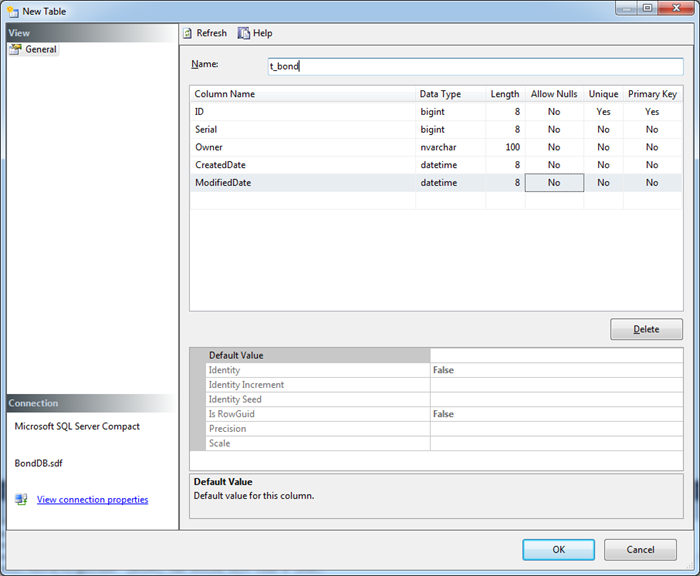
image

Figure: Initial Project Structure in Solution explorer

For data retrieve and saving used one of the oldest technology that is typed dataset. Below screenshot gives you an idea of that work. In the dataset we have a custom query for the dataset named “GetDataBySerial” which returns the prize bond with serial number.

image

Figure: Initial Project Structure in Solution explorer

Wrapping Up the Coding

I added main feature as CRUD of Bonds, Backup Data, Load Data and of course Match a bond number, to find out if we have a winner or not. 

Without any user interface brush-up the application looks like the bellow screen shot. pretty bad right. We would make it presentable in future i guess, for the time being the idea is to get the application to my client quickly.

image

Figure: Main Application First Look

Data Layer codes for CRUD is given bellow

using System;
using System.Collections.Generic;
using System.Data;
using PrizeBonds.BondDBDataSetTableAdapters;

namespace PrizeBonds.Objects
{
public class DAL
{
public List<Bond> GetList()
{
var tBondTableAdapter = new t_bondTableAdapter();
var tBondDataTable = new BondDBDataSet.t_bondDataTable();
tBondTableAdapter.Fill(tBondDataTable);
var dataRows = tBondDataTable.Select();
return GetBonds(dataRows);
}

private static List<Bond> GetBonds(IEnumerable<DataRow> dataRows)
{
var bonds = new List<Bond>();
foreach (DataRow row in dataRows)
{
try
{
var bond = new Bond
{
Id = (Int64)row["ID"],
Serial = (Int64)row["Serial"],
Owner = row["Owner"].ToString(),
CreatedDate = (DateTime)row["CreatedDate"],
ModifiedDate = (DateTime)row["ModifiedDate"]
};
bonds.Add(bond);
}
catch (Exception exception)
{
exception.ToString();
}
}
return bonds;
}

public void AddBond(Bond bond)
{
var tBondTableAdapter = new t_bondTableAdapter();
tBondTableAdapter.Insert(bond.Serial, bond.Owner, bond.CreatedDate, bond.ModifiedDate);
}

public void DeleteBond(long id)
{
var tBondTableAdapter = new t_bondTableAdapter();
tBondTableAdapter.Delete(id);
}

public List<Bond> GetBondBySerial(long serial)
{
var tBondTableAdapter = new t_bondTableAdapter();
var bondDataTable = tBondTableAdapter.GetDataBySerial(serial);
if (bondDataTable.Rows.Count > 0)
{
return GetBonds(bondDataTable.Select());
}
return null;
}

public void UpdateBond(Bond bond)
{
var tBondTableAdapter = new t_bondTableAdapter();
var tBondDataTable = new BondDBDataSet.t_bondDataTable();
tBondTableAdapter.Fill(tBondDataTable);
var tBondRow = tBondDataTable.FindByID(bond.Id);
tBondRow.Owner = bond.Owner;
tBondRow.Serial = bond.Serial;
tBondRow.ModifiedDate = bond.ModifiedDate;
tBondTableAdapter.Update(tBondRow);
}
}
}


Created single object to manage and the application, named “bond”


using System;

namespace PrizeBonds.Objects
{
[Serializable]
public class Bond
{
public long Id { get; set; }
public long Serial { get; set; }
public string Owner { get; set; }
public DateTime CreatedDate { get; set; }
public DateTime ModifiedDate { get; set; }
}
}


Add, Update and match Bond serial


Below a very simple Add Bond window code is given. Its a win form window with tool window border style and displayed as a modal dialog.


image


same window is displayed with some property modified, to update the data also.


public void SetData(Bond dataBoundItem)
{
_updateBondCandidate = dataBoundItem;
txtOwner.Text = _updateBondCandidate.Owner;
txtSerial.Text = _updateBondCandidate.Serial.ToString(CultureInfo.InvariantCulture);
}


below the update window is given.


image


Below match bond window is given.


image


Code for Add update bond


private void UpdateBond()
{
_updateBondCandidate.Owner = txtOwner.Text;
_updateBondCandidate.Serial = Convert.ToInt64(txtSerial.Text);
_updateBondCandidate.ModifiedDate = DateTime.Now;

var dal = new DAL();
dal.UpdateBond(_updateBondCandidate);
this.Close();
}

private void AddNewBond()
{
var bond = new Bond
{
Serial = Convert.ToInt64(txtSerial.Text),
Owner = txtOwner.Text,
CreatedDate = DateTime.Now,
ModifiedDate = DateTime.Now
};
var dal = new DAL();
dal.AddBond(bond);
this.Close();
}


code for match bond


private void btnMatchBond_Click(object sender, EventArgs e)
{
if (ValidData())
{
var dal = new DAL();
var bonds = dal.GetBondBySerial(Convert.ToInt64(txtSerial.Text));
if (bonds == null)
{
lblMessage.Text = @"No match found!";
lblMessage.ForeColor = System.Drawing.Color.Red;
}
else
{
lblMessage.Text = @"Success! match found! You are a winner!";
lblMessage.ForeColor = System.Drawing.Color.Green;
}
}
}


private bool ValidData()
{
if (string.IsNullOrEmpty(txtSerial.Text))
{
ShowValidSerialMessage();
return false;
}
char[] charArray = txtSerial.Text.ToCharArray();
foreach (var val in charArray)
{
if (char.IsDigit(val) == false)
{
ShowValidSerialMessage();
return false;
}
}
if (txtSerial.Text.Length != 7)
{
ShowValidSerialMessage();
return false;
}
return true;
}

private void ShowValidSerialMessage()
{
MessageBox.Show(@"Please enter 7 digit valid Prize Bond Serial");
txtSerial.Focus();
}

private void btnCancel_Click(object sender, EventArgs e)
{
Close();
}

private void txtSerial_KeyPress(object sender, KeyPressEventArgs e)
{
char keyChar = e.KeyChar;
if (keyChar.Equals('\r'))
{
btnMatchBond_Click(sender,new EventArgs());
}
}


Save and Load Bond Data


For saving and loading data used old serialization concept. Below the code for saving and loading bond data is given.


using System.Windows.Forms;

namespace PrizeBonds.Objects
{
public class BackUpManager
{
public void LoadRule()
{

// Configure open file dialog box
var dlg = new OpenFileDialog { FileName = "Prize Bond Manager",
DefaultExt = ".pbm", Filter = @"Prize Bond Manager Files (.pbm)|*.pbm" };

// Show open file dialog box
var result = dlg.ShowDialog();

// Process open file dialog box results
if (result == DialogResult.OK)
{
// Open document
var filename = dlg.FileName;
var serializer = new Serializer();
var deSerializeObject = serializer.DeSerializeObject(filename);
var bonds = deSerializeObject.Bonds;
var dal = new DAL();
foreach (var bond in bonds)
{
dal.AddBond(bond);
}
}
}

public void SaveRule()
{
var dal = new DAL();
var bonds = dal.GetList();
if (bonds.Count == 0)
{
const string message = @"You do not have any bonds to Save, thus I am unable "
+ @" to save any bonds. Please add some bonds before Saving";
MessageBox.Show(message);
return;
}

var dlg = new SaveFileDialog { FileName = "Prize Bond Manager",
DefaultExt = ".pbm", Filter = @"Prize Bond Manager Files (.pbm)|*.pbm" };

// Show save file dialog box
var result = dlg.ShowDialog();

// Process save file dialog box results
if (result == DialogResult.OK)
{
// Save document
string filename = dlg.FileName;
var serializer = new Serializer();
var objectToSerialize = new ObjectToSerialize { Bonds = bonds };
serializer.SerializeObject(filename, objectToSerialize);
}
}
}
}


In future release I would try to improve the look and field of the application. since the purpose of the application is only to match and keep data. And of course the application will be used only in once a month so investing huge time to make it more stunning won't be  a good idea., but still will invest some amount of time.


Conclusion


In this short article we have built a small application for managing prize bond with some of the old technology exists in ms world. Hope you would like it. Please drop comment if you like it and don’t forget suggest me improvement tips.

Friday, October 19, 2012

SDF Database: Re Create objects if you missed setting primary key as identity

I was developing a demo application, as database I chose to add “.sdf” local database file. I added some columns and set primary key. Some how I forgot to set the identity property of primary key.

Went back to the same interface and try to modify the table schema and set identity property. End up with the following error.

image

I thought setting some property for instance “Prevent Saving changes that require table re-creation. In Options->Database Tools-> Table and Database Designers will do the job.

image

But it didn’t, Later what I did is very bad and didn’t feel any good about it. I cleared the table. Deleted the old ID field. And re-create the same ID column with right property again.

I would appreciate if any body help me on this issue to edit a primary key identity property without deleting or clearing the data.

Friday, October 12, 2012

Asp.net: Required Field Validator with DropDownList

Today I want to share a very simple stuff That I learned while working, its kind of a silly learning, but hopefully will help someone someday. I want to make sure that a DropDownList is been selected before submitting a form. In asp.net we have a control for validation name “RequiredFieldValidator”, till now I have seen using this with only textbox. Below an example is given.

<asp:TextBox runat="server" ID="txtNumber" Width="200px"></asp:TextBox>
<asp:RequiredFieldValidator ForeColor="red" runat="server" ID="rfvNewTrackingNumber"
ControlToValidate="txtNumber" ErrorMessage="* Please type number">
</asp:RequiredFieldValidator>


But we can actually use this required field validator with DropDownList as well. Below another example is given for using with DropDownList


<asp:DropDownList runat="server" ID="ddlMethods" AppendDataBoundItems="True" Width="205px">
<asp:ListItem Value="0">Select Method</asp:ListItem>
</asp:DropDownList>
<asp:RequiredFieldValidator ForeColor="red" runat="server" ID="rfvNewMethod"
ControlToValidate="ddlMethods" ErrorMessage="* Please select method" InitialValue="0">
</asp:RequiredFieldValidator>


Note that in ListItem we have assigned Value=0 and in RequiredFieldValidator InitialValue=0 that is the main trick. If you have binding code in c# please make sure you also Set DataValueField.


Until next time.